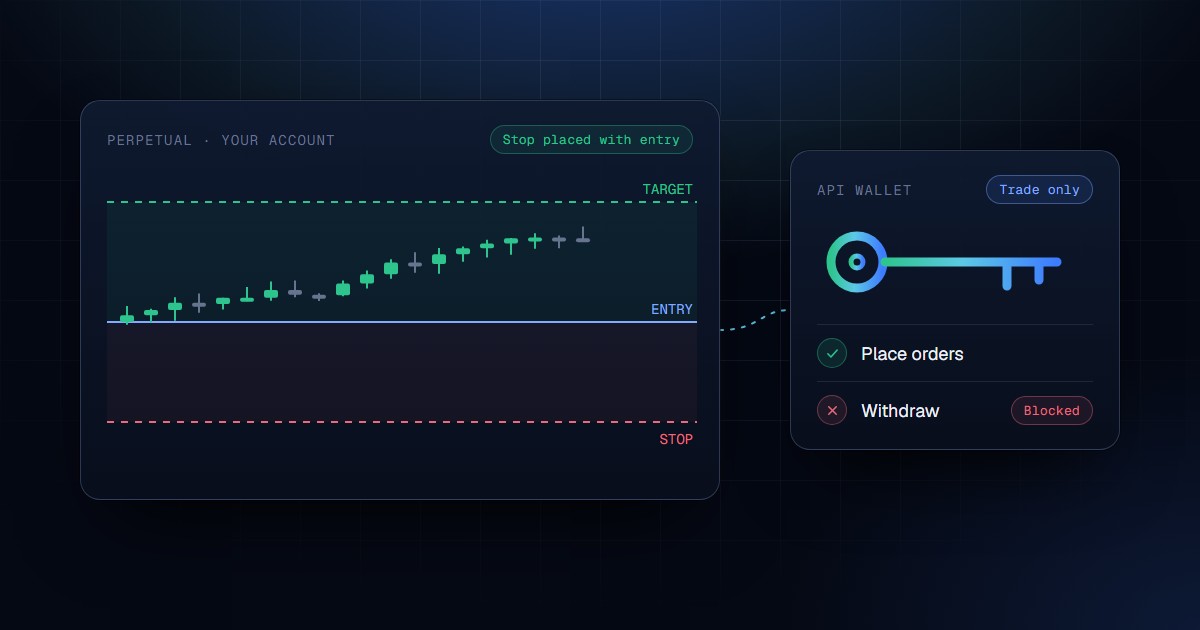
Short answer: HyperTradeAI connects to your Hyperliquid account through a trade-only API wallet that you approve from your own wallet. When a signal provider you follow publishes a trade, the platform sizes it from your risk settings and live balance, checks it against your limits, and places the entry with its stop-loss and first take-profit on Hyperliquid. The API wallet can place and cancel orders. It cannot withdraw or transfer your funds. This integration is built and in testnet testing. It isn't open to investors yet, and the status section at the end says exactly what's ready.
Hyperliquid has become a natural home for automated trading. Orders are signed actions sent to a public API, the order book is on-chain, and the exchange lets you approve a separate key that can only trade. That makes a Hyperliquid trading bot easy to build. It doesn't make one you'd trust with your account at 3am.
This piece is about the second part: what an AI-assisted, automated workflow on Hyperliquid should do around the order itself, and how HyperTradeAI's integration is designed to do it.
Key takeaways
- You never hand over your Hyperliquid private key. You approve a trade-only API wallet in your browser, and you can revoke it at any time.
- Every entry is sized from your risk settings and live balance, then checked against your limits before it's signed. A stop-loss is required by default.
- Signals come from providers whose track records are sealed on-chain before the outcome is known, so the automation runs on data nobody can rewrite.
- Hyperliquid support is in testnet testing. Mainnet trading opens only after a deliberate approval step.
Why automate on Hyperliquid at all
Perpetual futures don't wait. Funding is charged every hour, liquidations cascade in minutes, and a setup that was good at the signal price can be gone by the time you've unlocked your phone. Manual traders on Hyperliquid tend to lose in the same three places:
Speed
By the time you've seen an alert, opened the app and worked out a size, the entry has moved. On a fast market a late fill is a different trade.
Sizing
Leverage makes it easy to risk far more than you meant. A position sized "by feel" at 20x can carry several times the risk you'd have planned on a calm day.
Protection
An entry without a resting stop is a bet that you'll be awake when it goes wrong. Most blown perps accounts had a position with no stop at the moment that mattered.
Automation fixes the first. It only fixes the other two if it's built around your limits rather than around the signal. A bot that copies someone else's size, or places entries and "adds stops later", automates the mistake instead of removing it.
Connecting your Hyperliquid account without giving up your keys
Hyperliquid lets an account owner approve an API wallet (also called an agent wallet): a separate key that can sign trading actions for the account. HyperTradeAI uses exactly that, and nothing more.
Prove the wallet is yours
Connect your browser wallet and sign a standard sign-in message. No funds move, and no form anywhere on HyperTradeAI asks for a private key or seed phrase.
Set your limits first
Choose a plan and confirm a short risk acknowledgement, so your limits exist before any order can.
Approve a trade-only API wallet
HyperTradeAI generates a fresh API wallet for your account and shows you only its address. You approve it from your own wallet under the name htai. It's valid for 90 days.
Approve the builder fee
You approve a maximum builder fee of 0.05% per order. The platform can charge less than you approved, never more.
Confirmed on the exchange
Before your account goes active, the platform checks with Hyperliquid that the API wallet and the fee approval are registered to your address.
What the API wallet can do
- Place, modify and cancel orders
- Set leverage and isolated margin
- Place stop-loss and take-profit orders
What it cannot do
- Withdraw funds from your account
- Transfer funds to another address
- Approve other wallets or change your permissions
- Outlive your decision: revoke it on Hyperliquid at any time, and it expires after 90 days
One honest note on custody, because other HyperTradeAI articles describe broker keys staying on your own execution agent. Hyperliquid is the exception. For Hyperliquid accounts, HyperTradeAI holds the API wallet key on its own infrastructure, encrypted in a dedicated key vault, so orders can be placed without you running a server. What it holds is permission to trade, not your funds. The key can't withdraw, the platform never sees your main wallet's key, and revoking the API wallet stops it from signing anything.
Where the AI fits: signals worth following
Automation is only as good as what it executes. HyperTradeAI doesn't invent trades of its own. It routes signals from verified signal providers to the investors who follow them, and AI sits at two points in that path.
Scoring every signal before it's distributed
Every signal gets a confidence score when it's submitted. The score is built from the provider's recent performance and the shape of the trade itself: stop distance, reward-to-risk, and how the setup fits the provider's own history. Signals also carry a quality grade, and your position size scales with it: smaller on weak setups, fuller on strong ones, always inside your own cap.
A track record nobody can edit
Each signal is sealed on-chain at the moment it's published, before the outcome is known, and its result is anchored when it settles. That matters more on Hyperliquid than almost anywhere: leaderboards and PnL screenshots are easy to cherry-pick, and a bot following a cherry-picked trader just loses money faster. How the seal works →
To be clear about what this is: HyperTradeAI follows signal providers. It doesn't mirror another Hyperliquid wallet's positions. If you're searching for Hyperliquid copy trading, the difference matters. You follow a provider's published, sealed signals, and every order is sized for your account, not copied at the provider's size.
What happens when a signal fires
Here's the path one signal takes to your Hyperliquid account. Nothing skips a step.
Sizing from your account
Your risk per trade for that market class, scaled by the signal's quality grade, divided by the stop distance. Then your allocation to that provider and the exchange's size step are applied. Leverage is the lower of your cap and the exchange's maximum for that market.
Your pre-trade risk check
The sized entry is checked against your rules: daily loss limit, exposure per asset and across the account, maximum order value, stop-loss required, signal age, and whether that market class is enabled for you. If it breaks any rule, it isn't placed, and you see every reason in plain words.
Last-mile checks against the live market
Just before signing, the platform rechecks that your account is active, the API wallet is valid, the live price is within your slippage tolerance of the signal's entry, and you have free margin. If margin is short, the order is reduced to fit, or refused.
Signed with independent limits
The signer enforces its own caps: approved markets only, a price band around the live price, a per-order size cap and a daily volume cap per account. Even a bug further up can't push an order past them.
Entry, stop and target together
The entry, its stop-loss and the first take-profit go to Hyperliquid as one action, so protection exists from the first fill. Later targets are added once the entry fills.
Market entries go out as immediate-or-cancel orders priced at your slippage tolerance from the live price, and never worse than the signal's entry plus that tolerance. If the market has run away, the order simply doesn't fill. A missed trade costs you nothing. A bad fill costs you the trade.
Risk controls built for leverage
Leverage is why people trade perps, and why most perps accounts end. These are the default rules in the current build, and you can tighten them in your settings.
| Control | What it does | Default |
|---|---|---|
| Daily loss limit | Stops new entries for the day once losses reach it | 5% of equity at the start of the UTC day |
| Stop-loss required | An entry without a stop isn't placed | On |
| Exposure per asset | Caps how much of your equity sits in one asset | 50% |
| Gross exposure | Caps total open position value | 300% of equity |
| Leverage cap | Lower of your cap and the exchange's maximum | From your risk settings, per market class |
| Signal age | Skips automated signals that arrive late | 60 seconds |
| Builder-deployed markets (HIP-3) | Third-party perp markets need your opt-in | Off |
Two of these deserve a note. First, risk checks gate entries only. Stops, take-profits and closes never pass through them, so a daily loss limit can never block the order that protects you. Second, every rule fails closed. If the platform can't read a fresh view of your account, it doesn't guess. It skips the trade.
Stops that keep up with the trade
Once a position is open, protection keeps working. When the first target fills and the signal asks for it, the stop moves to the entry price, so the trade can no longer lose. If you set a trailing distance, the stop follows the best price at that distance and never moves back. If an entry only partly fills, the stop and targets are replaced for the size you actually hold.
Seeing what the automation did
Automation you can't audit is a black box with your money in it. For Hyperliquid accounts, HyperTradeAI reads positions, balances and fills straight from the exchange and keeps them next to the signal behind each trade:
- Account overview. Balance, open positions, margin in use and leverage, in both standard and unified account modes.
- Full fill history. Every fill, its fee, and the signal and order behind it.
- Orders not placed. Each refused entry with the exact rule it broke, so a missed trade is explained, not a mystery.
- Notifications. By email or Telegram when an order is placed, a stop is hit or a target is reached.
- A Proof Report. For any Hyperliquid address: realised PnL, win rate, drawdown, holding time and how consistently positions carried a stop, computed from the exchange's own data.
The platform also reconciles your account with the exchange on a schedule and after every reconnect. If it finds an order it didn't create, such as one you placed by hand, it flags it and leaves it alone. It never touches trades that aren't its own.
If you'd rather click than automate
Not every investor wants every signal placed for them. If you follow a provider in manual mode, their signals in your feed show an Execute on Hyperliquid button. One click runs the same path as an automated follow: the same sizing, the same risk checks, the same stop and targets. The only rule that relaxes is signal age, because a person deciding now isn't a stale feed. It still won't place the same signal twice on the same account.
Not to be confused with the Hyperliquid Vault
Two different Hyperliquid products
The Top Traders Index has an on-chain Hyperliquid Vault version, described in the AI Robo Advisor article. That's a pooled vault, and a later phase gated by the token launch and regulatory review. This article describes something else: your own Hyperliquid account, your own funds and your own risk settings, trading the signals you chose to follow. Nothing is pooled.
Questions to ask any Hyperliquid trading bot
Does it ask for your private key?
If yes, stop. Hyperliquid's API wallets exist so no tool ever needs it.
Can its key withdraw?
An API wallet can't. A main-wallet key can. Know which one you're handing over.
Is every entry protected from the first fill?
"We add the stop after" leaves a window where you're exposed.
Whose numbers size the trade?
Your balance and your risk settings, or a fixed copy ratio from someone else's account?
Can you verify who you're following?
A track record sealed before outcomes are known, or a leaderboard screenshot? How to spot a fake track record →
Where HyperTradeAI's Hyperliquid integration is today
Current phase status
Here's the plain answer. Everything described above is built and tested against Hyperliquid's testnet and a full exchange simulator: wallet connection and API wallet approval, sizing by market class, the pre-trade risk checks, the signer's limits, stops attached from the first fill, break-even and trailing stops, reconciliation, account views, the Proof Report, one-click execution and notifications. None of it is open to investors yet. Automated trading stays switched off until a person turns it on, and mainnet trading needs a separate, explicit approval that hasn't been given. Following Hyperliquid wallets as signal providers, and paper trading, are still in development. HyperTradeAI as a whole is in its pre-launch phase.
We'd rather you plan around that now than find out later.
Frequently asked questions
Does HyperTradeAI need my Hyperliquid private key?
No. You approve a trade-only API wallet from your own wallet in the browser. No form or endpoint on HyperTradeAI accepts a private key or seed phrase.
Can HyperTradeAI withdraw funds from my Hyperliquid account?
No. The API wallet can place, change and cancel orders, but Hyperliquid doesn't let an API wallet withdraw or transfer funds. You can revoke it at any time, and it expires after 90 days.
Is this Hyperliquid copy trading?
Not in the usual sense. You follow signal providers whose signals are sealed on-chain before the outcome is known. Each order is sized from your own balance and risk settings, not copied from another account.
Can I use HyperTradeAI on Hyperliquid today?
Not yet. The integration is built and in testnet testing. Join the waitlist to hear when Hyperliquid accounts open.
The bottom line
Hyperliquid makes automated trading easy to build. The hard part is everything around the order: sizing from your account, a stop from the first fill, limits that hold while you sleep, and a key that can trade but never withdraw. That's the part HyperTradeAI is built to handle, on signals whose track records you can check rather than trust.
Trading perpetual futures with leverage involves substantial risk of loss, including liquidation. Past performance, verified or otherwise, does not guarantee future results. Nothing here is investment advice.